Program your light show like a song.

Finally, a light show without becoming a lighting tech. Your first show is ready tonight.

Checkout canceled — no charge was made.

Windows 10/11 (64-bit) · macOS (Apple Silicon & Intel) · one-time purchase · 2 devices · works fully offline

Watch a real light show being built
Tutorial video coming soon

INTERACTIVE PRODUCT PREVIEW

Build a song in Band Light OS

Set up a virtual stage, choose a sample song, add a light block, then play it back.

This temporary preview stays in your browser: no account, saved show, DMX output or hardware connection.

You're a musician. Why should you have to learn lighting tech?

You want a light show. Not a weekend seminar.

That's exactly why Band Light OS exists.

Made for musicians, not lighting techs

You don't think in patches and universes. You think: red light in the chorus, moving heads on the guitar solo. That's exactly how Band Light OS works — with songs, bars, setlists and your stage.

Other lighting software

  • Two hours of YouTube tutorials — and still not a single working light
  • Manuals full of jargon: patching, fixtures, cue stacks
  • The show only happens if a lighting tech has time for you

Band Light OS

  • Your first light show is ready in minutes
  • You program the way you think: "red in the chorus" — done
  • On stage the show runs itself, song by song

Everything a band needs — nothing you have to study

No lighting console, no jargon, no weeks of learning. Build your light show the way you build your set.

The show follows the band

One tap on a drum pad or footswitch starts the next song's lights. Nobody touches the laptop during the gig.

Program lights like a song

Pick a song and place colors and effects right on the bars — red in the chorus, strobe in the solo. With the waveform behind it, a full song takes minutes.

Works with any stage lights

Cheap PARs or pro moving heads — anything that speaks standard stage lighting (DMX) works. One small network box connects your laptop to the lights.

No internet needed on stage

After a one-time activation the app runs without internet — exactly what you need in a venue basement.

See your show before the gig

Build your stage as a simple top-down plan and watch every light and beam in a live preview — before you've plugged in a single lamp.

Music and light in sync

Attach the song's audio and the lights follow the music exactly. A ready-made wiring plan (PDF) shows what to plug in where at load-in.

Made for DJs too

Program your set's light show in advance, fire it from a pad on your controller, and improvise from the keyboard — no lighting operator needed at your booth.

Lights that hear the music

No time to program? Sound to Light lets the lights react to the music by themselves — flashes and color changes on every beat.

A quick tour

Three views cover the whole workflow: build your stage, program your songs, run your set.

Design your stage in minutes

Drop your PARs, LED bars, moving heads and band members onto a top-down stage plan. Beam cones show exactly where the light lands, and the live preview colors every light in real time while the show runs.
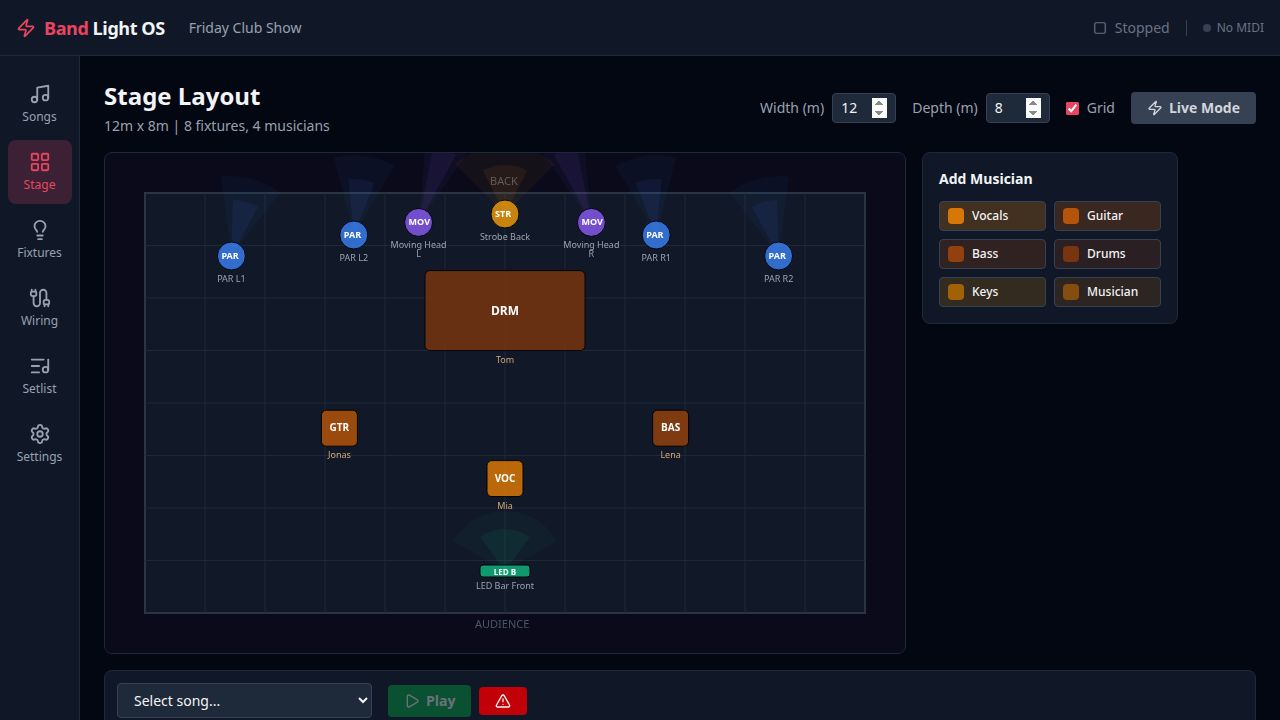
2D stage view with fixtures and musicians

Program lights per song, per beat

Every song gets its own timeline. Place colors, fades, strobes and chases on a beat grid — with the song's waveform behind them, snapping, and copy/paste to build a full set fast.
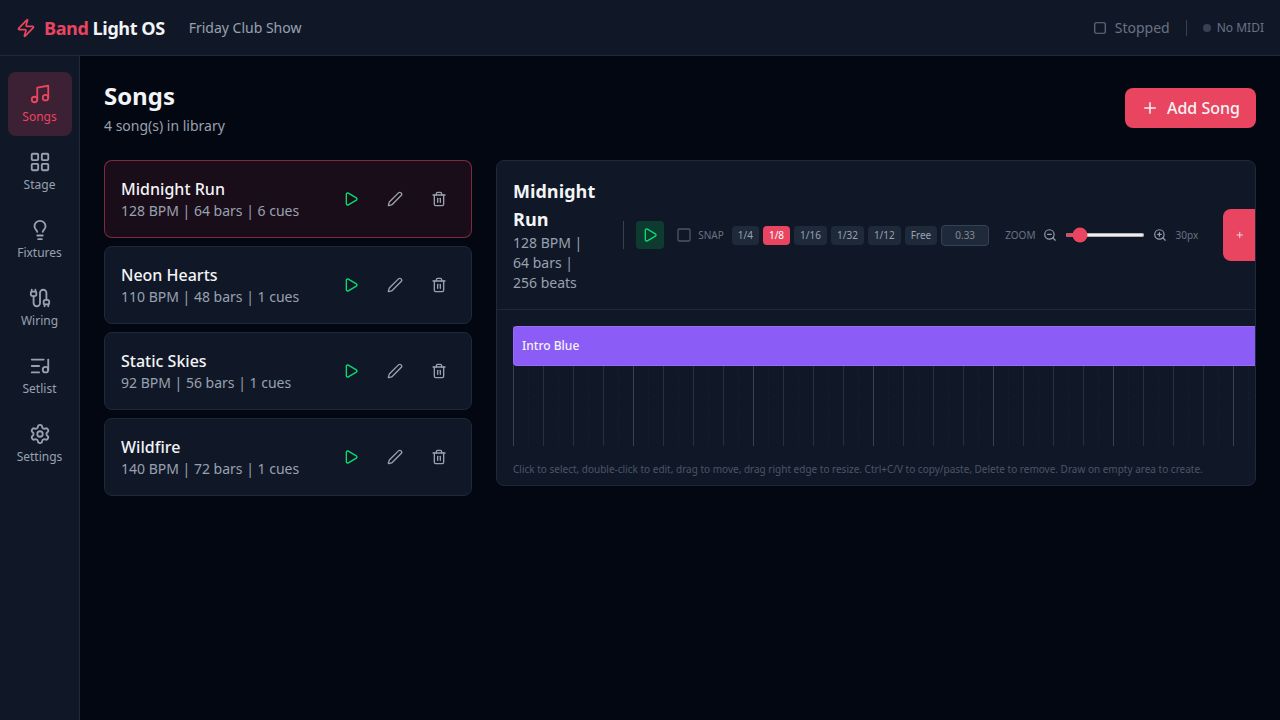
Beat-based cue timeline editor

Run the show hands-free

Put your songs in a setlist and any MIDI note advances to the next one — from a drum pad, footswitch or keyboard. Transport controls, audio volume and a panic button are right there if you ever need them.
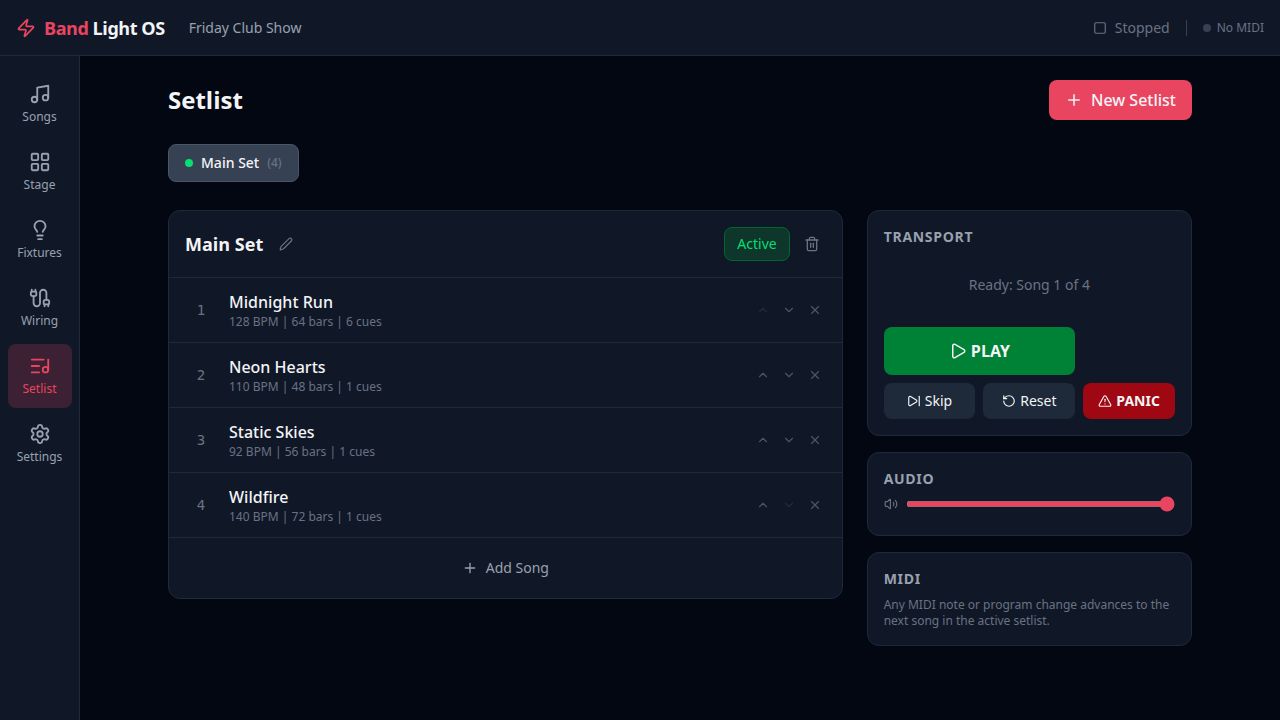
Setlist view with transport controls

What you need to get light

No expensive console, no special hardware. Your laptop sends the light data over the network to a small Art-Net box that speaks DMX — that's the whole chain.

Laptop

Runs Band Light OS on Windows 10/11 (64-bit) and macOS. It computes every light cue in real time.

→

Art-Net node

An affordable Art-Net-to-DMX adapter, connected via network cable or Wi-Fi. Available from around €50.

→

DMX cable

One cable from the node to your first light, then daisy-chained from light to light.

→

Your lights

Any DMX-capable fixture works: PARs, LED bars, moving heads — cheap or pro.

Optional: a MIDI trigger (drum pad or footswitch) advances your setlist automatically — so the show follows the band, not the other way around.

No lighting console. Just your laptop.

You don't need a complicated lighting desk or a trained operator. Everything runs from the laptop — and when you want to improvise, Live Mode puts the whole rig on your keyboard: colors and fixture groups at the press of a key, even mid-song.

1–8 colors · 0 blackout · A all lights · S/D/W fixture groups

What bands are saying

Reviews from verified buyers.

Download the app

The download is free — you need a license key to activate and use Band Light OS.

Windows 10/11 (64-bit)

Checking availability…

Coming soon

macOS

Apple Silicon (M1–M4)

Checking availability…

Coming soon

Intel Mac

Checking availability…

Coming soon

No key yet? Buy a license — it's shown instantly after purchase.

Simple pricing

One license, no subscription, free updates.

Regular price

€79 one-time purchase · incl. VAT

  • Desktop app for Windows 10/11 (64-bit) and macOS
  • Activate on up to 2 devices
  • Works fully offline after activation
  • Free updates

Could not start checkout. Please try again.

Secure payment via Stripe. Your license key is shown instantly after purchase.

Share Band Light OS

Recommend Band Light OS: your referral link gives €10 off and you receive €20 after a successful purchase.

Every paid customer gets a personal referral link. Rewards are checked for abuse and become payable after 30 days. No spam, please.

Who could benefit? For example solo musicians, DJs, bands, schools, youth centres, theatres, clubs or small venues.

Read the referral programme terms